WRITING
It Printed Output Every Single Run — That's Why Nobody Noticed It Was Missing 86%
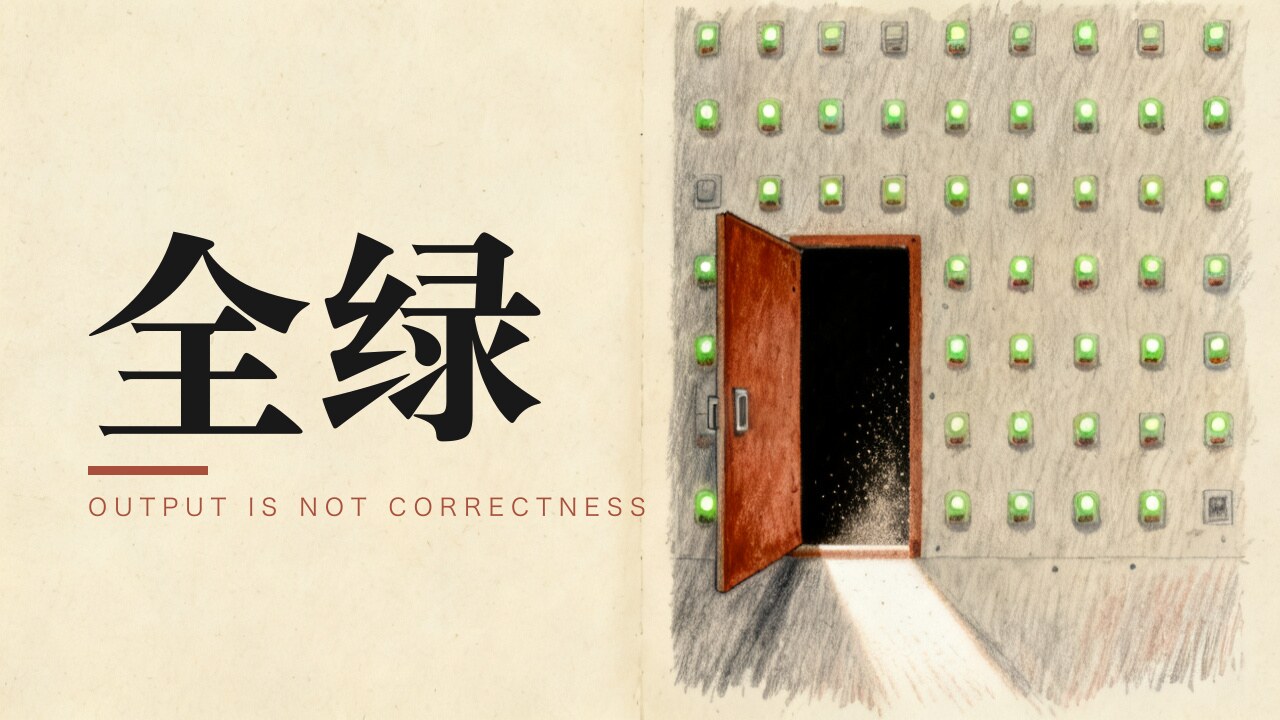
A script ran for two months. Every run produced output. Every output looked fine. It was missing 86% of my text messages.
1. A script that printed output every run, and missed 86%
I was building one thing: a merged timeline of calls and texts, so I could see how often a given number and I had been in contact over the years. On the way in, I glanced at the old script that exported messages.
Its logic: "take messages with a non-empty body, start from the newest, print five."
Run it, and everything looks fine — five recent messages, complete text, correct dates. Anyone would say it works.
Then I changed "start from the newest" to "start from the oldest" and looked at the 400 oldest messages in the database:
Nothing. Not one.
The data wasn't gone. Apple had changed where it stores things.
Every message has two possible slots for its body. The old system used the first; newer systems write to the second — and the second one is packed, so reading it directly gives you garbage. You have to unpack it first. My script only ever read the first slot.
For historical reasons, messages from roughly the last year still have something in the first slot. So every time I spot-checked the five most recent, I landed squarely in the one small patch that was still visible.
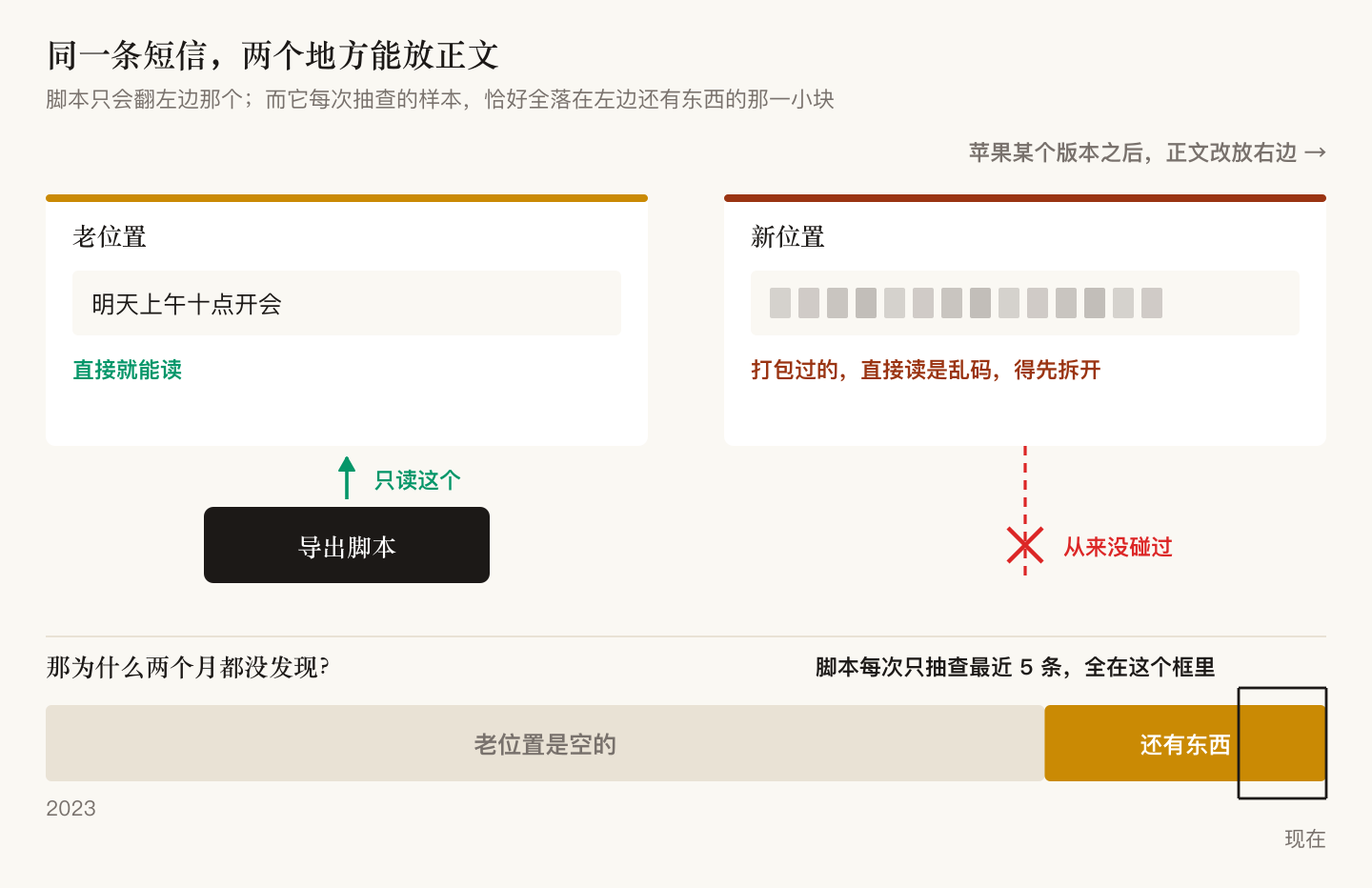
Of 10,254 messages with a body, it could see 1,442.
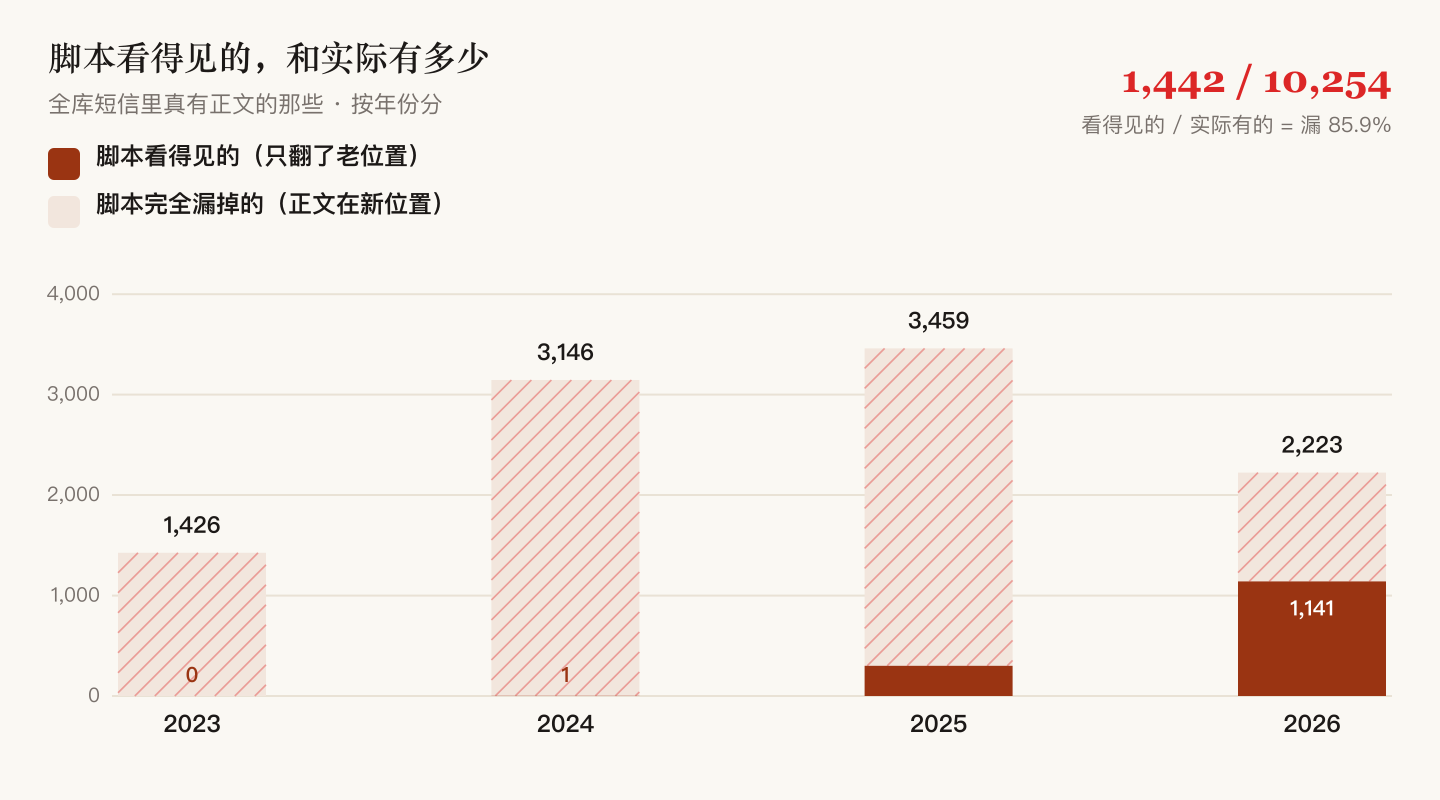
Two months. Not one error, ever.
And for those two months, I had been using its output to make decisions.
2. Cutting: 19 tools, 2 survivors
It started with a blunt question: what are these projects for — I have no idea what you're doing.
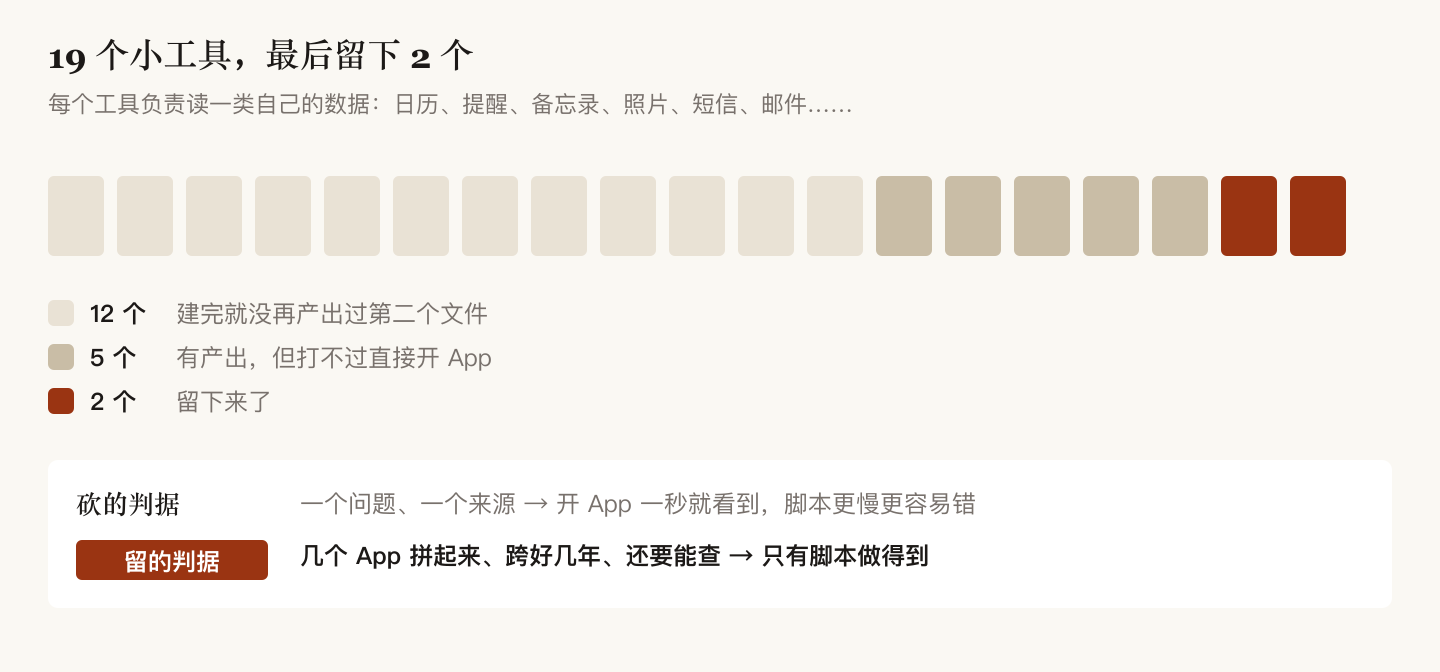
I had built 19 small tools in the personal-data workspace, now consolidated under ~/Apps/apple-data/, each reading one category of my own data — calendar, reminders, notes, contacts, photos, messages, mail, browsing history, music, podcasts, maps, health.
The audit was ugly:
12 of the 19 never produced a second file after the day I built them. Two months, and nothing had ever called them.
Not because they were badly written. Because they lose to just opening the app.
"What have I been listening to?" — open Music, one second. A script reading its database is slower, more fragile, and needs repair every OS upgrade. The health domain has no database at all; notes had two notes; maps had eight records; podcasts had three subscriptions.
A script wins in exactly one situation: when you need several apps' data stitched together, across years, and queryable.
"How many times has this number been in contact with me over three years, calls and texts combined?" Calls live in the Phone app, texts in Messages, and the two never join. Both can be scrolled but not queried. No app can answer that.
So the direction wasn't to fix all 19. It was to cut down to the two that genuinely need stitching.
The two that survived
One: find which project mentioned something.
My material isn't in any note-taking app. There isn't a single Obsidian vault on this machine — the two I had were stale for one to two years and got deleted. What's actually useful is scattered across 6,682 markdown files in 124 projects across 7 top-level directories: proposals, requirements, meeting notes, project docs, bid documents.
Finding "which project mentioned X" used to mean searching project by project, several passes across directories, still missing things. Now one command returns the file, the line number, and the matching line itself.
Two: how often has this person and I been in contact.
Call history plus messages, stitched by phone number into one timeline, then joined with names from the address book. 12,721 records, from June 2023 to now.
Two traps here, neither of which you'd guess: the same person looks different in all three stores (contacts, call history, and messages each use a different format — unify them or one person counts as three), and the address book isn't one database, it's three — read only the first and you lose two thirds of your contacts.
It also produced a number I didn't expect: of 677 contacts, only 97 have any call or text history. Everything else went through WeChat, whose data isn't in this pipeline.
So this timeline is a record of the phone-and-SMS channel, not everything. Knowing where its boundary is matters more than the number itself — otherwise the next person computes "how many people do I know" and gets nonsense.
One whole domain deleted along the way
Mid-cleanup I noticed PastePal (a clipboard-history tool) had been dead for 26 hours — process gone, not launching at login, last write to its store the previous morning. It had stopped working.
So should the nine months of accumulated history go too? Not a feeling question. Measure first — 20,358 entries:
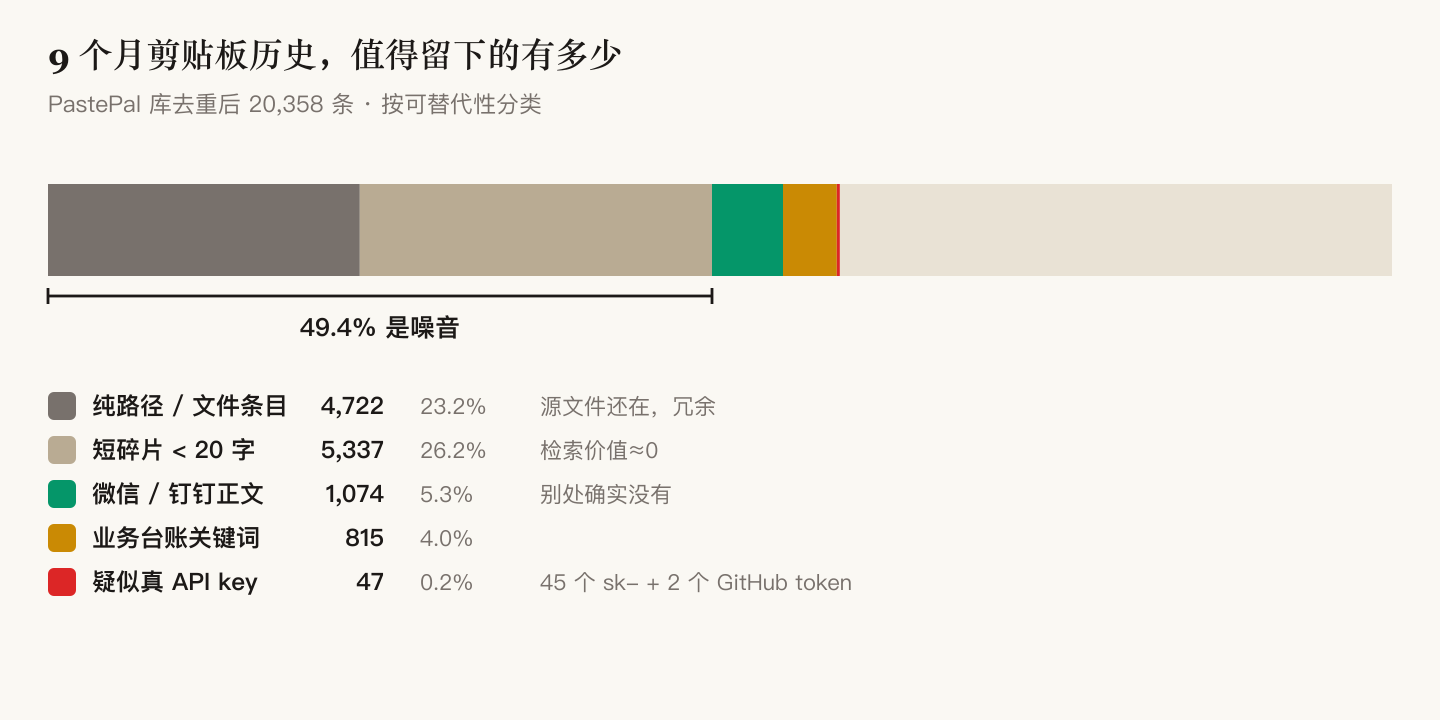
| What it is | Count | Share |
|---|---|---|
| Bare paths and filenames (source file still exists) | 4,722 | 23.2% |
| Fragments under 20 characters (nothing to retrieve) | 5,337 | 26.2% |
| WeChat / DingTalk message text (the only genuinely irreplaceable part) | 1,074 | 5.3% |
| Business keywords | 815 | 4.0% |
Things that look like live credentials (45 sk- prefixed, 2 GitHub tokens) | 47 | 0.2% |
Half noise, 5% irreplaceable, and it was steadily copying credentials into itself — from a source that had already stopped.
Deleted. The app, its 7.3 GB of data, and its scripts all went to the trash, then a full-disk search to confirm nothing was left. 7.4 GB, all recoverable.
Those 47 credentials were incidental. They had nothing to do with whether to keep the index — they'd been sitting there all along, and nobody had ever looked.
3. 6,682 documents: the valuable part is excluding what mustn't move
The ask was simple: merge what overlaps, archive what's done.
The first version was five lines — fingerprint each document's text, same fingerprint means duplicate. Result:
459 groups, 1,134 files, 675 removable.
That number is toxic, because deleting most of them is destruction:
- One batch is documentation the package manager stores per version — delete them and the next install brings them back
- One batch is a template distributed into nine projects — to change them you change the source, not the copies
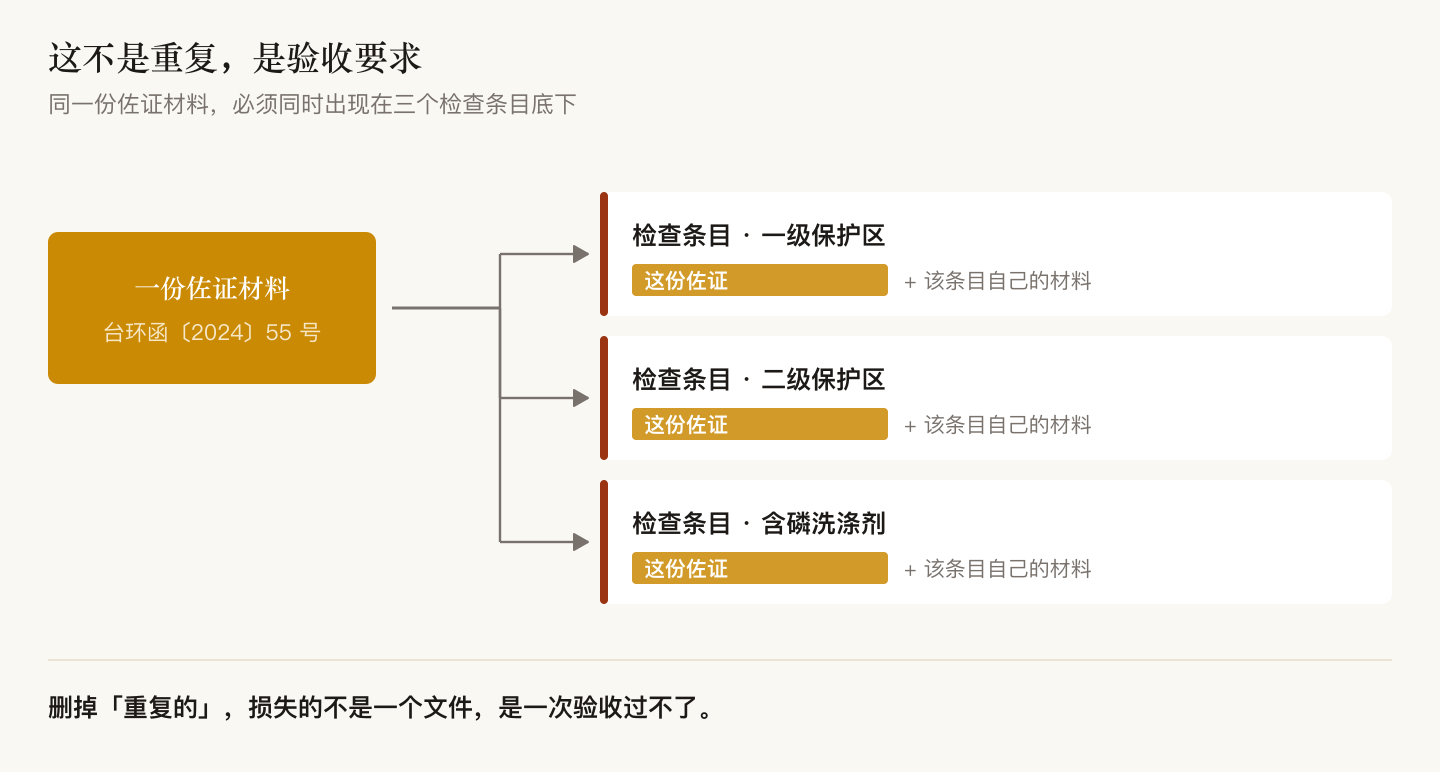
- And one batch: the same document filed under "protection zone tier 1," "tier 2," and "phosphate detergents" at once. That's a review requirement — every checklist item must have its own supporting evidence underneath it
So the tool was rewritten: exclude what can't be touched, layer by layer, and only look at what's left.
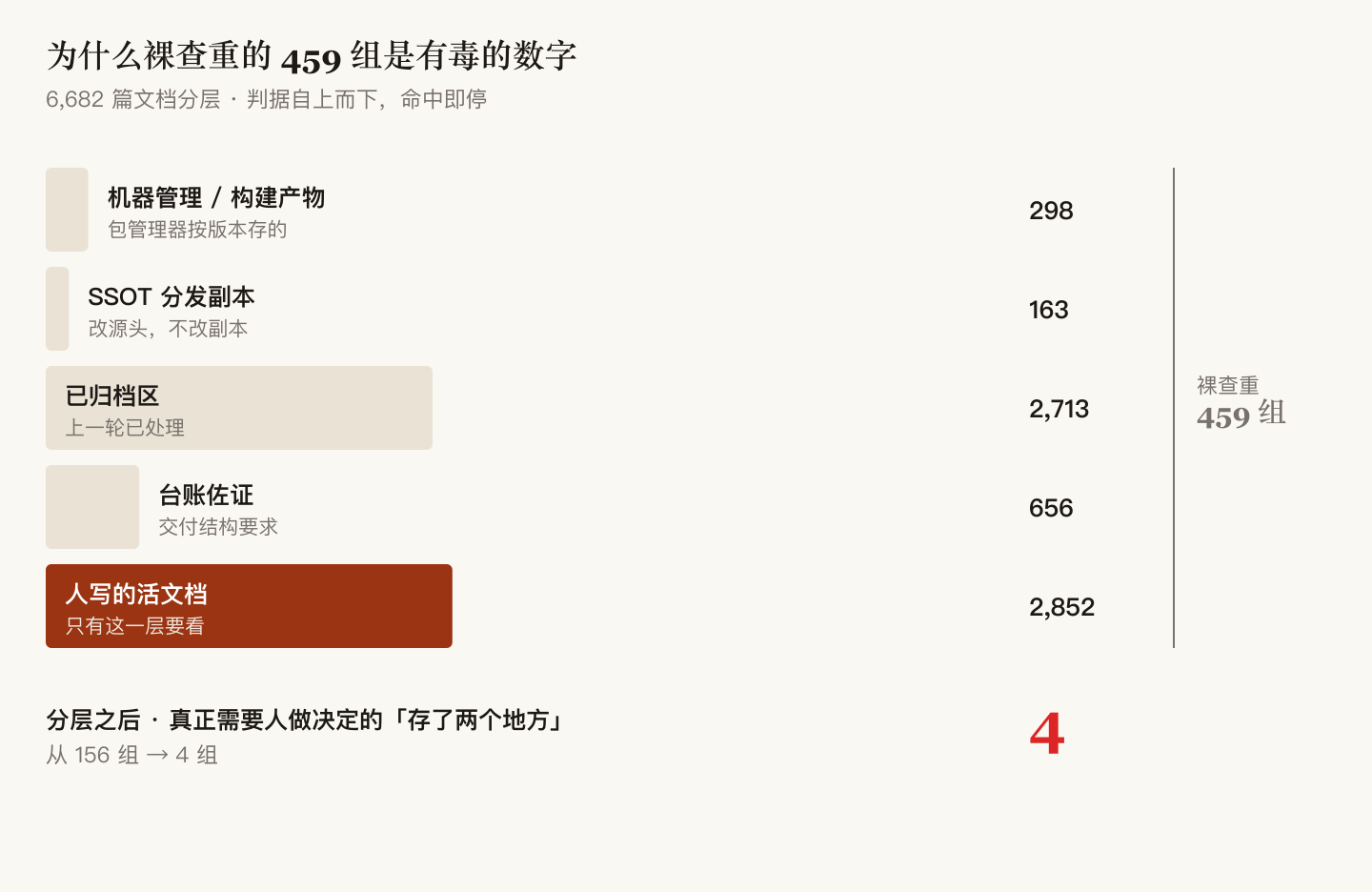
Of 6,682 files: 298 machine-managed, 163 template copies, 2,713 already archived, 656 required as review evidence — all excluded first. That leaves 2,852 documents actually written by a human. Only that layer matters.
Within it, what genuinely needed a decision went from 459 groups to 4; after cleanup, a run today reports 0.
Finding duplicates is five lines of code. The value is in excluding what mustn't move.
The harder tier: duplicates with a few words changed
Once the byte-identical ones were clean, the note came back: "mostly it's about merging, or archiving some of it."
That's when I realized everything so far had been the surface layer. The same thing written two or three times, edited apart in places but overlapping in substance — one changed character and the fingerprint approach is blind. And that tier is what "the documents are getting messy" actually means.
There's a standard way to judge "how similar are these two": cut each document into small fragments and measure overlap. But comparing everything against everything is too slow, so each document needs a short fingerprint first.
Version one used the textbook method, which recomputes each fragment 128 times. It ran 120 seconds without finishing and I killed it. The replacement computes each fragment once, sorts, and keeps the smallest batch as the fingerprint. Mathematically equivalent, and it finished the whole corpus in 17.7 seconds.
This isn't about saving 100 seconds. It's that at 120 seconds it never finishes, so this whole tier of duplication would simply never be seen.
It found 149 heavily-overlapping pairs. After checking each one — 71 of them are correctly similar, and touching them would be destruction:
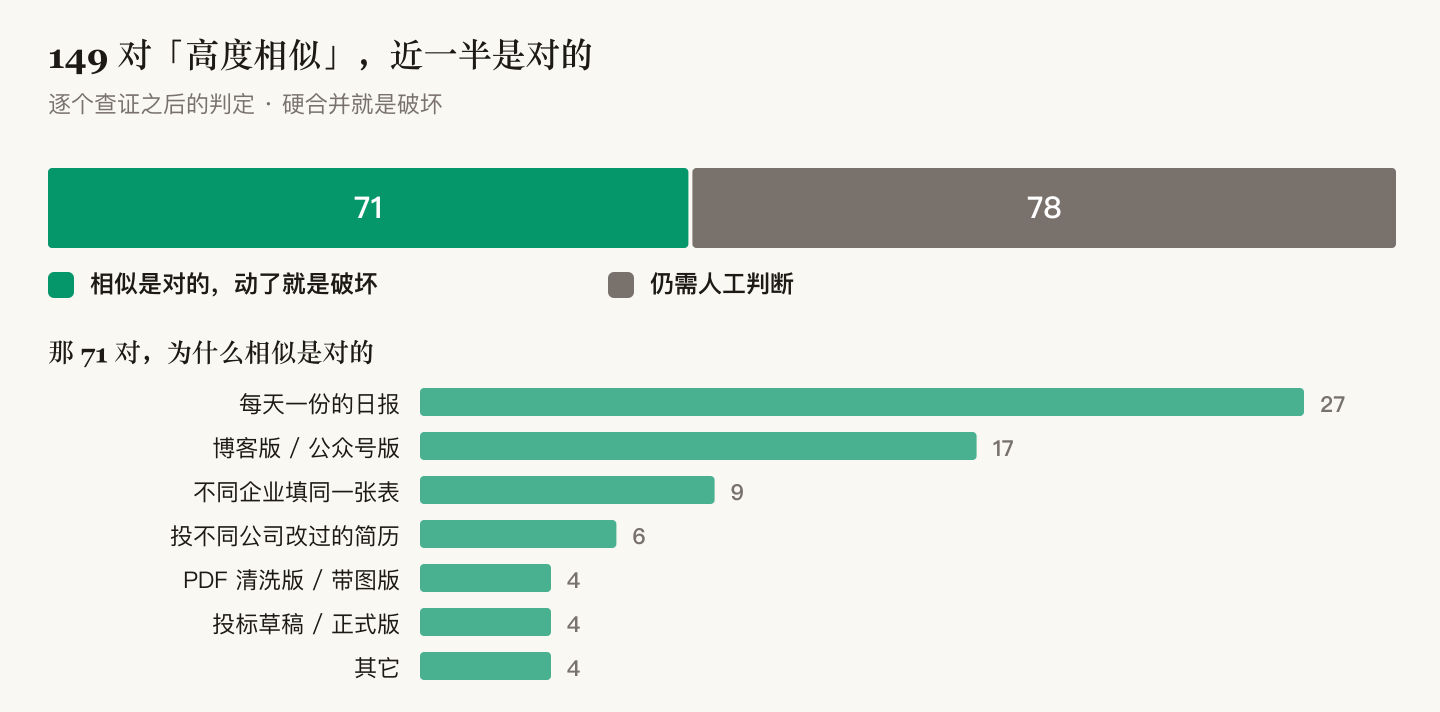
| Pairs | Why the similarity is correct |
|---|---|
| 27 | Daily reports — same template, different numbers; merging destroys the record |
| 17 | Blog version and WeChat version of one article — meant to be separate |
| 9 | One form filled in by different companies — each is its own data |
| 6 | Résumés tailored per company — being similar is the point |
| 4 | Cleaned vs illustrated extraction of one PDF — merging loses either the figures or the cleanup |
| 4 | Draft vs final of a bid — can't tell which was submitted, so don't guess |
| 4 | Others (an atlas and report sharing captions; projects sharing one doc skeleton) |
What actually got archived was a different set: leftovers from a one-off migration, four processing stages of one completed bid, four runs of the same report within two hours, and a copy 2 directory from a Finder slip. All moved into each project's own archive folder with a note on how to restore. Nothing left its project. Nothing was deleted.
4. Three mistakes I made, and the shape all three bugs share
Everything above sounds confident. Along the way I was wrong three times, each time the same way: I measured with a ruler I hadn't verified, then believed the measurement.
Mistake 1: the reconciliation script was the broken one.
I wrote a script to cross-check the index. One side counted 224, the other 221. I concluded the index had a bug. In fact my cross-check was broken — one character in its matching rule is a wildcard, so it was counting things it shouldn't. Fixed, and six terms matched six for six.
If the ruler you're calling ground truth hasn't itself been verified, a disagreement only says one of the two is wrong. It doesn't say which.
Mistake 2: my own indexer was manufacturing fake duplicates.
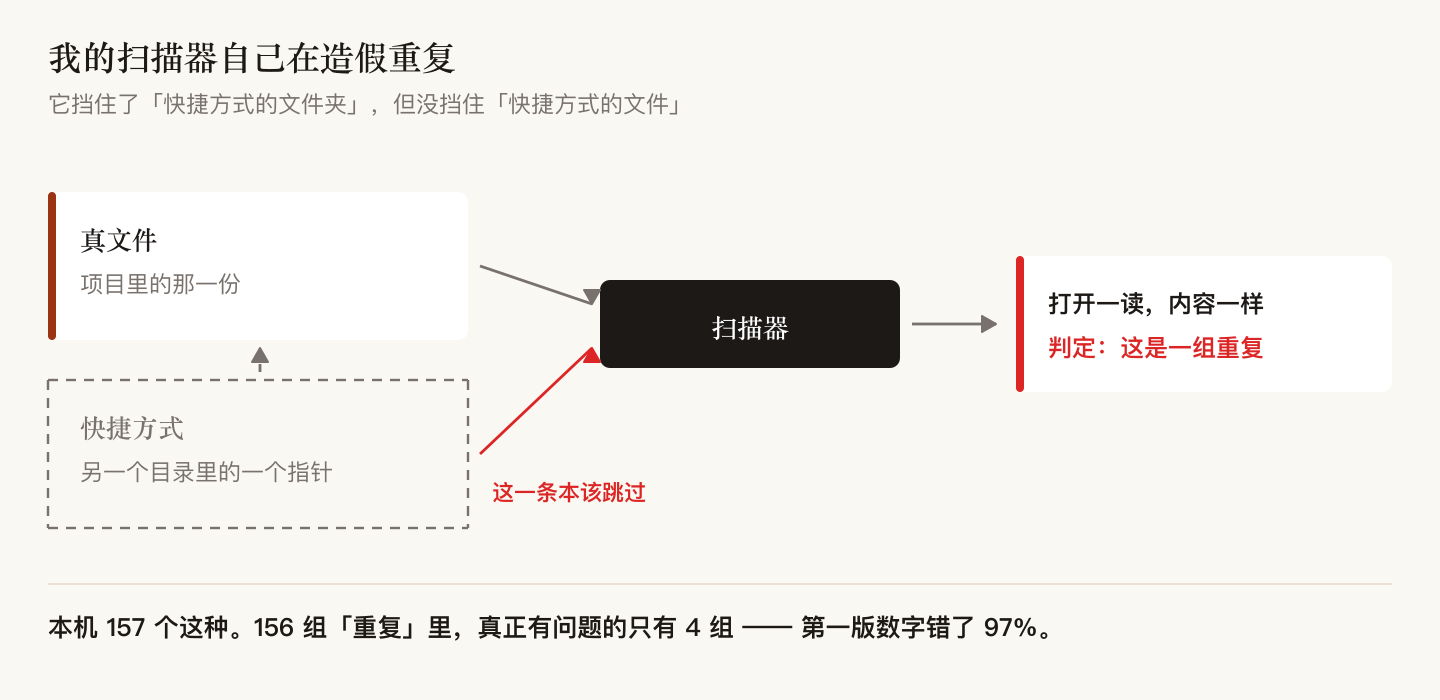
The audit reported 156 groups of "the same thing stored in two places." I wrote it up as real debt.
They were shortcuts. My scanning code blocked shortcut folders but not shortcut files — those still get listed, and opening one still reads the target's content.
Two other "real problems" in the same batch were also wrong: one was a directory the build syncs automatically by design, the other a directory whose own source code says, in plain words, "this is a mirror."
Of 156 groups, exactly 4 were real. My first number was off by 97%.
Mistake 3: I nearly archived two real deliverables.
Three shoreline atlases overlapped 93%. I judged two of them conversion leftovers and moved them into the archive. Per procedure I searched for references first — and the project's own documentation said they are formal documents with Word and PDF companions. Moved straight back.
The criterion went into the code: a markdown file with a same-named Word or PDF beside it is not a leftover — it's one face of a real deliverable. Always search for references before archiving.
Three bugs, one shape
Three silently-wrong things came out of this round. Side by side, they're identical in shape:
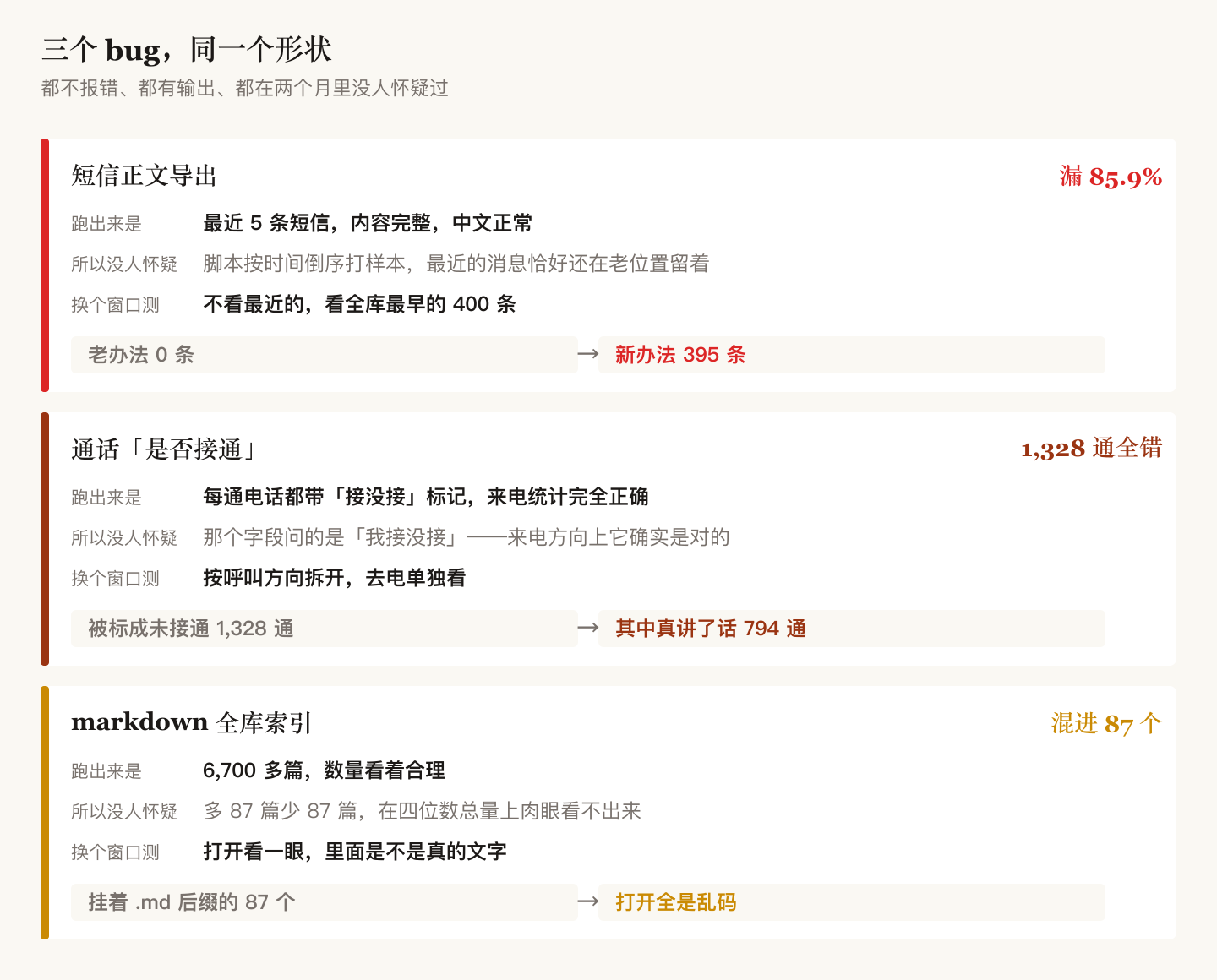
The second is sneakier than the first. The call history store has a field whose name reads exactly like "did this call connect." Statistics built on it are completely correct for incoming calls — 1,485 of 1,788 marked answered, matching reality.
But for outgoing calls the field is always 0. Because it doesn't ask "did the call connect," it asks "did I answer" — and on a call I placed, there's no answering to do.
Result: all 1,328 outgoing calls counted as "never connected," 794 of which were real conversations. The correct test is duration greater than zero. Nothing errors; the stats print tidy numbers every time.
The third: 87 binary files carrying a .md extension slipped into the index. At a scale of 6,700, plus or minus 87 is invisible.
All three are the same thing: output every run, so nobody doubts it.
5. So what counts as verified
"Test more" is not advice. Only two things actually worked.
One: don't fabricate ground truth — find it in the data.
To prove my decoding was correct, my first instinct was to hand-write test data. That's wrong — data I write comes from what I think the format is, so it tests my understanding, not the implementation.
The right move is to find messages written twice: once in the old slot, once in the new one. That batch is ready-made ground truth requiring no assumptions.
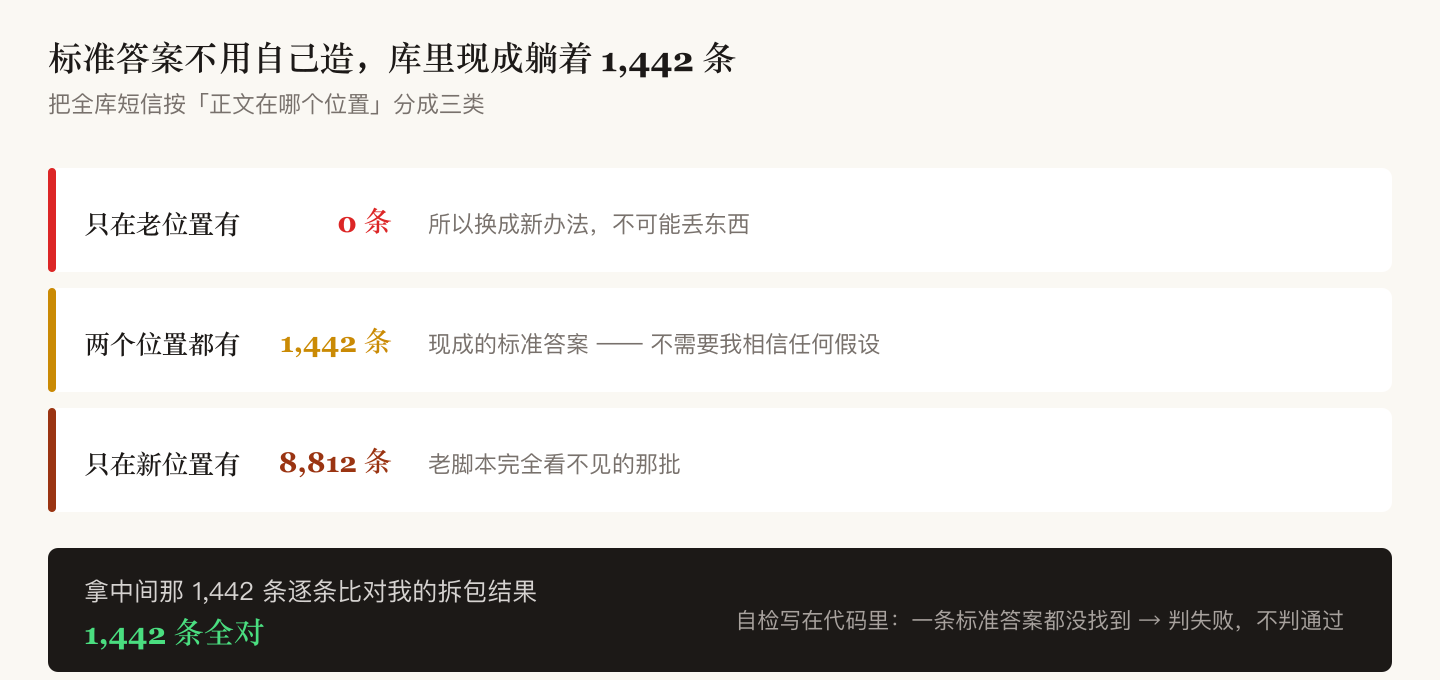
There are 1,442 of them. Compared one by one: 1,442 out of 1,442 correct.
One more number matters just as much: there are zero messages that exist only in the old slot and not the new one. So switching cannot lose anything.
It also produced one crucial number: there are zero messages that exist only in the old slot and not the new one. So switching to the new method cannot lose anything.
The self-check lives in the code and must be re-run on any change. One line in it matters most: if not a single ground-truth row is found, fail — do not pass. Otherwise, the day the schema changes and the query returns nothing, it quietly prints PASS — which is exactly the bug from section 1.
Two: the moment you write a guard, verify it backwards.
I added two safeties to a sync tool: if the source directory doesn't exist, error out; if it exists but contains no files, also error out and never overwrite with emptiness.
Writing them isn't the end. I put the failures back and ran it twice for real:
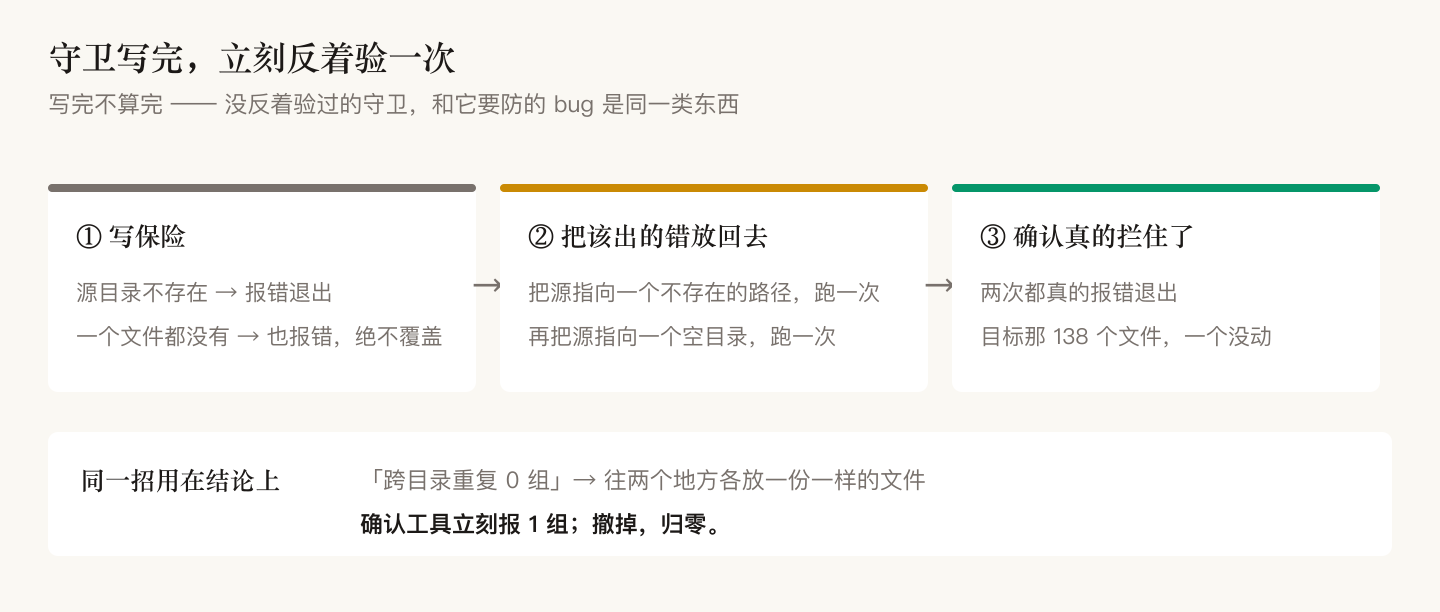
The "0 cross-directory duplicates" claim got the same treatment: drop an identical file into two places, confirm the tool immediately reports 1; remove it, confirm it returns to 0.
A guard you haven't verified backwards doesn't count — a dead guard and the bug it was meant to catch are the same category of thing.
The ledger
| Built | 2 indexes (6,682 documents; 12,721 contact records) |
| Cut | 12 dead domains, 1 entire domain, 7.4 GB |
| Verified | 3 silently-wrong pipelines, one missing 86% for two months |
Of the three, verified paid the most. A pipeline that looks green while being wrong is far more dangerous than one that's obviously broken — the broken one you fix; the green one you use to make decisions.
If only one line survives:
Output on every run doesn't mean it's right. Find somewhere something should be visible, and test it there.
RELATED
FOLLOW
New posts land here first. Subscribe via RSS: /feed.xml
AUTHOR
Tianli Zeng
Hydraulic engineer. I write about AI methodology and engineering practice.